 DeskCalm
A gentler way to organise your Mac
A little less clutter.
A little more room.
For the files you’ll sort “later”.
Make a start without making it a big thing.
Free to download · No account needed
New design preview — App Store update coming soon
 One folder at a time.
A fresh start, at your pace
Less to look at.
Less to work around.
Simple choices. A clear next step.
Designed for days when organising feels like a lot.
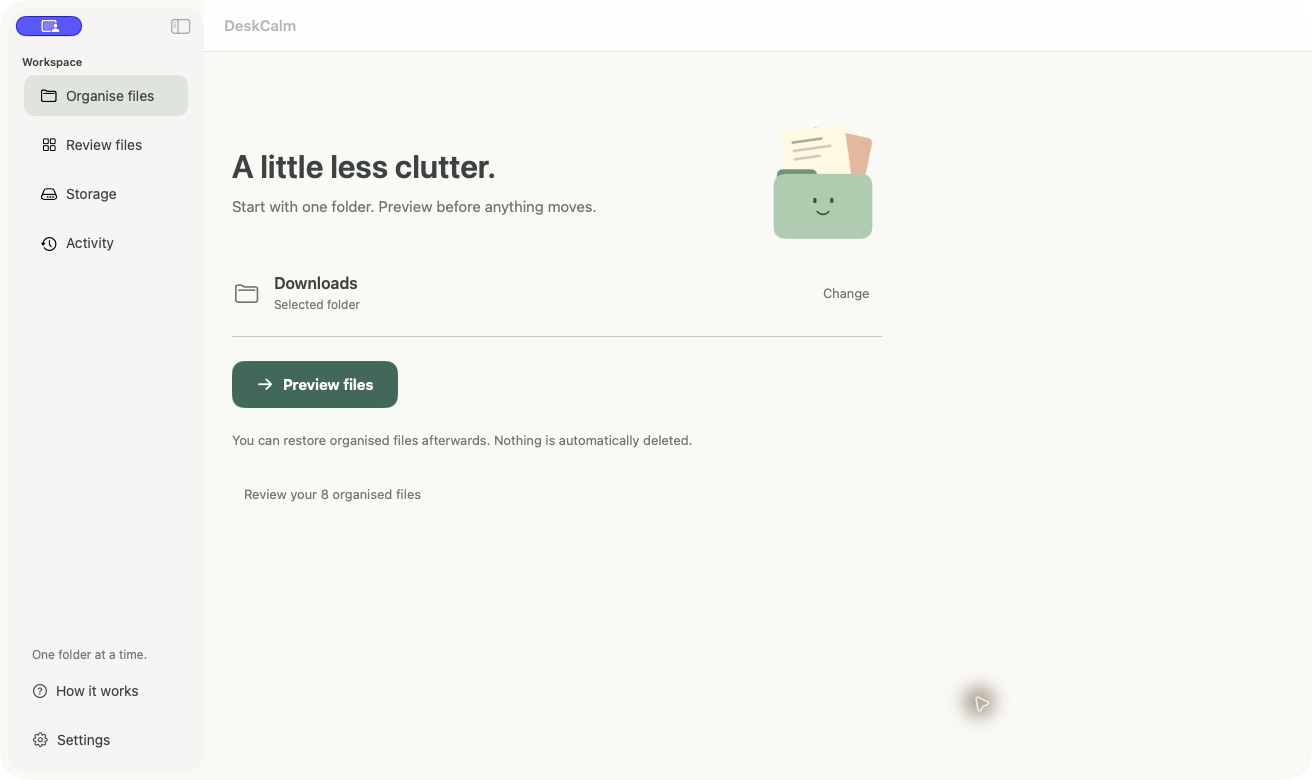
Preview of the new DeskCalm update. Some features shown are coming in the next App Store release.
Small steps. Real progress.
You don’t have to
sort everything today.
One folder. A fresh start.
Pick the folder you want to work on. Leave the rest for another day.
Made for focused minds
Clutter happens.
No guilt required.
There’s no score to keep up with. No streak to lose.
Just a friendlier way back to a little order.
A few things you might be wondering
Room for questions.
Is DeskCalm free?
Yes, DeskCalm is currently free on the Mac App Store. There is no subscription or account to set up.
Does it delete my files?
DeskCalm organises by moving files. It does not automatically delete them. The new storage view is read-only: it shows what is taking up space and lets you reveal files in Finder.
Can I change my mind?
The new update lets you preview and choose files before organising, then review moved files and restore selected ones. Restore can be affected if you move or remove the files afterwards.
Do my files leave my Mac?
No. The app works with the folders you allow it to access on your Mac. It does not upload your files or require a cloud account.
Will it work on my iPhone or Android?
DeskCalm is a Mac app. You can browse this website on your phone, but there is no iPhone or Android app at the moment. Check the App Store listing for current Mac compatibility.
Are these screenshots of the current App Store version?
They show the new design and features being prepared for the next update. The App Store listing remains the source for what is available to download today.